Showing posts with label Berlin. Show all posts

Wednesday, 27 September 2023

B2Run Berlin 2023

Event Page: B2Run Berlin


Short but fun company run with the Sehsucht team (well, the 3 of us who made it!). Nothing much to say, the route is pretty boring but the arrival in Berlin's Olympia Stadium is impressive. It's a nice team-building event, especially for non to casual runners.


Sunday, 3 April 2022

Generali Berlin Half-marathon 2022


I can't believe it's been 6 years already, since the 2016 Berlin Half and Marathon that I ran with my Cheeselady. But with our busy life as exhausted parents and our families living far away, we ain't got much time to train and run events together... 😵 That needs to change! 

Very cozy half today, nice weather and uplifting atmosphere as usual. It's our 3rd participation and although I'm not found of the route (too much asphalt for me, I prefer my woody trails), I was really happy to share this moment with someone I love 🏃💑


Saturday, 11 August 2018

Test of the GPS watch TomTom Runner 3

 Cet article est disponible en français ici.  


After 4 years of wandering around with my faithful Forerunner, I had to change it this year, not without disappointment, since the battery barely holds two hour now and I couldn't find a 42 km long prolongation cable! Therefore, my goal for the next one is to get a reliable product with advanced functionalities for an entry-level price. I give myself a budget of 150 €. Last I've heard, I'm not Kilian Jornet, so I don't need to give out a rent for a watch!

I considered different models and set my mind on a Tomtom Runner 3, for one reason mostly: it is offering a navigation option, that you usually only find on state-of-the-art models like the Garmin Fenix. With prices ranging from 89€ (no cardio), 125€ (cardio, my version) and 199€ (cardio + mp3 player) it is one of the cheapest GPS watch currently on the market. Let's see if it's worth every penny.


1. Unboxing - The first impression is pretty good. The watch is smaller and thinner that it looks on the pictures. With 50g, you barely feel it at your wrist. It is composed of two parts, the bracelet and the watch case, that you need to take apart to charge it or connect it to the computer. It contains a square control pad too, with four buttons, that you use to interact with the watch and that I find more intuitive than the usual side buttons. The bracelet looks resistant, we'll see on the long term, and the fixation system is really well designed. The watch fits well around the wrist and does not move.


2. Test run - The Runner 3 is packed with options. I will need more that a stroll in the park to examine it from all angles. Fortunately, I got the watch just on time for my last long run (40 km), before tapering for the Eco-Tail de Paris (45 km) in three weeks. I'm ready, let's try this baby outside!

It's Sunday morning and I'm waiting in front of the door for the GPS signal to start my long run. Like most watches, the Runner 3 pre-loads the satellites position when connecting to the computer and the QuickGPS is fast. I get a green light in barely 15 seconds.


3. Interface - Let's check the interface first. It's a cold and sunny day. The readability is very good. The contrast of white text on black screen makes it visible from all angles with little sun reflections. The watch displays three data: a large one in the middle, that you can change during the activity using the control pad, and two smaller ones at the bottom, that you can configure beforehand. A fourth data would have been nice, as runners often check at least time, distance, pace and heart-rate during a run. Finally, you can find on the top bar the usual symbols: satellite, heart-rate, Bluetooth and batterie life.


4. Heart-rate monitor - Home is where the heart is, let's have a look at mine! Wrist cardio monitors are becoming a standard and the Runner 3 goes with the flows. A sensor and a green LED are embedded on the back side of the watch, in contact with your skin, and measure the blood flow. Good-bye itchy chest straps! Still, for testing purposes, I take my old Forerunner and strap with me, for comparison. The heart-rate value of the Runner 3 is pretty accurate, maybe a little optimistic and a few beats below the one I get from my chest strap.


A graph analyses my progression and what cardio zone I am in (Fat burn, Cardio, Performance, etc.) I just notice a delay after sudden accelerations. The watch needs some time to notice the change and even after, the value stays 10 to 20 bpm below the strap one. The watch seems to smooth the heart-rate variations, which is fine on a steady run but not for speed work. In that case, it would be probably wise to buy a compatible strap.


5. Navigation - It's about time to test my favourite option! Perfect timing, as I'm on the starting line of the Eco-Trail de Paris, 45km of muddy and poorly marked-out trails in the middle of the woods. TomTom Sports lets you upload a GPX file, that will be sent automatically to the watch next time you connect it. It's fast and really handy. Using an online tool like Wandermap, you can create a route and send it to the watch. See my Turtle Run article in this edition for example.

I downloaded the GPX route from the race website and sent it to the watch. I can now select it before starting the activity. There are four navigation screens, rights from the main one, corresponding to three levels of zoom (close-up, surroundings and complete route) and a metric compass.


The map is simple, just a little arrow representing you and a white line marking your progression. If you pre-load a route like I did, it shows up as a grey line that you can follow (or not, if you are a rebel like me!). All in all it is extremely simple and efficient. No directions calling, no notifications, no display of the surroundings. Just the bare necessities! I keep an eye on my progression all along the event, and avoid this way to take a wrong path or miss a turn. I just regret that I don't get notified when I step out of the route. But let's be honest, we all hate to hear the GPS repeat "make a U-turn when possible!"


6. Batterie Life -  Second aid station, I'm running out of stamina. What about my little friend? One of the main decision criteria for me in a watch is its autonomie. Who cares about having the best options when your watch dies on you half way through the race? TomTom guaranties a battery life of 9:00, with GPS and cardio monitor on. When I cross the finish line of the Eco-Trail de Paris, after 6:15 on the way, my watch still has about 10% of battery. Therefore, I guess the real autonomie would be around 7:00 to 7:30. You can increase it to 9:00-10:00 by deactivating the heart rate monitor if you don't need it. Overall it should be enough for races up to 80 km, but not above. It is unfortunately impossible to charge the watch on the way using a power bank.


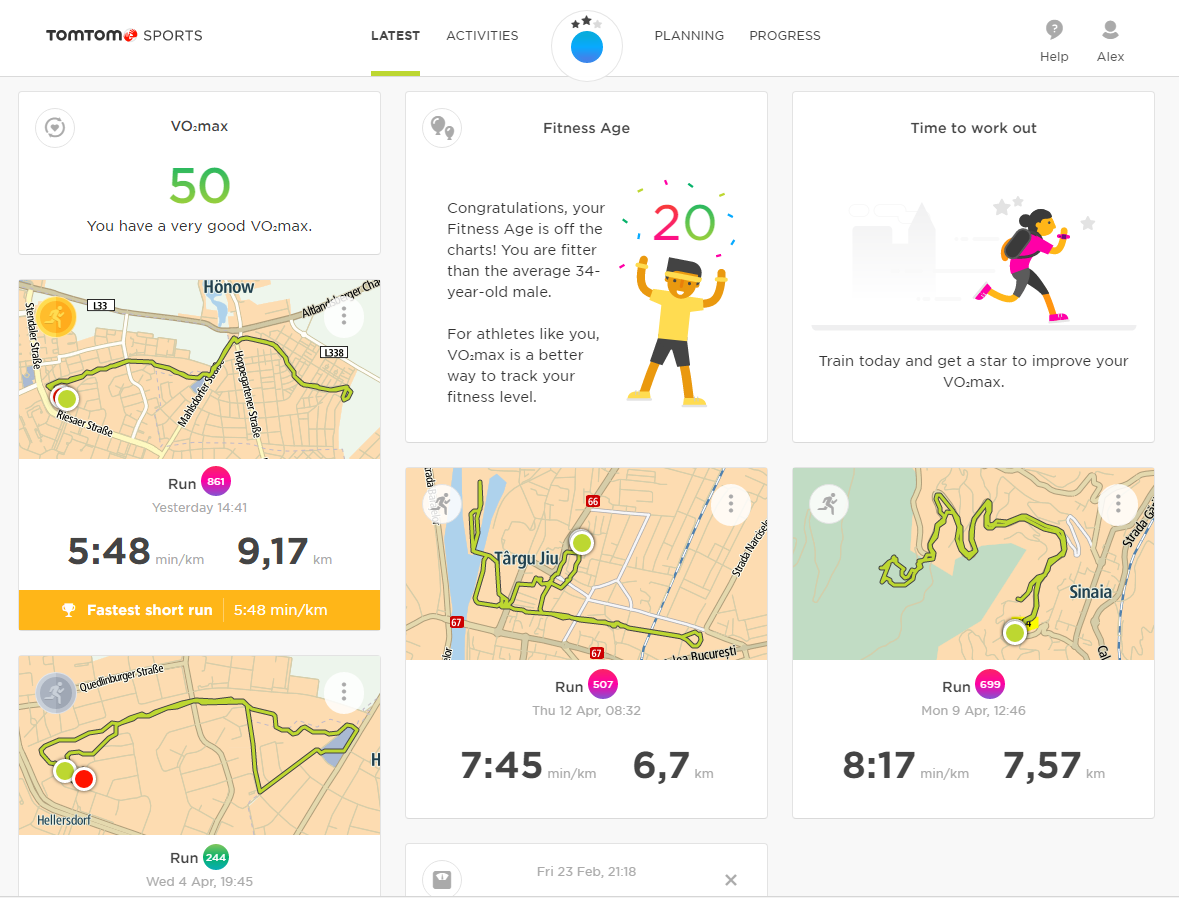
7. TomTom Sports - Back home after my muddy adventure, I connect the Runner 3 to the computer, via the USB cable (also used for charging). The activity is sent in a few seconds to Tomtom Sports, Strava, Relive and all connected services. The smartphone app can do the same via Bluetooth. I take a quick look at the interface, quite pleasant, with pastel tons and cartoon pictures. It's like watching the Disney channel!

The menus are refined and simple, with the usual post-race stats, graphs, maps and everything you need to keep track of your adventures: distance, time, pace, elevation, heart-rate, splits, etc. Altogether, it looks rather intended for the casual runner than the professional one. The dashboard is a bit messy and cannot be configured, like on Garmin Connect. On the map, the precision of the route I travelled is pretty accurate, overlapping with the roads and forest trails most of the time.


8. Activity Tracker - If you are interested, the watch can be used as a daily activity tracker too, counting your steps, checking your heart rate, analysing your sleep and texting your mom what time you go to bed! I don't like being told what to do, so I deactivate it to save on battery.
9. Additional - As said, the Runner 3 is chock-full of tech and options, that I had the pleasure to discover along the way. I won't detail them all here, but to name a few, the watch includes more than 50 workouts, you can create your own, define training goals, run against yourself or calculate your fitness age and your VO2max. Finally, it is worth mentioning that the watch is waterproof 5ATM, a good thing when you've got mud up to the chest!


10. Conclusion - I have been using the TomTom Runner 3 for four months now. Let's sum up its strong and weak points:

+ Competitive price around 125 € (Amazon.de, March 2018)
+ Thin and light, intuitive interaction using to the control pad
+ QuickGPS fast, about 10 seconds to acquire a GPS signal
+ Good contrast, screen readable even by sunlight
+ Built in heart rate monitor reliable most of the time
+ Very useful navigation option with just the bare necessities
+ Good batterie life suited for runs up to 80 km
+ User-friendly interface on the TomTom Sports website and app
+ Countless workouts, goals and modes included

- Only 3 data displayed at once, only 2 configurable
- No recap screen displayed after stopping the activity
- Heart-rate monitor not suitable for speed work
- No notification when we step out of a pre-loaded route
- Online dashboard a bit messy and not configurable
- Phone notifications only for calls and sms

To conclude this test, I must say that I have been pleasantly surprised by the TomTom Runner 3. For an entry-level model with a price below 150€, a friendly interface and an arsenal of options, it does not compare unfavourably to its state-of-the-art expensive rivals. For me, it is now a reliable comrade in arms that will stand by my side on all upcoming adventures, that I won't forget to share with you!

Feel free to check my blog for an extended review of the watch (in French).

Monday, 6 August 2018

GPS Art Run #1 - Slow as a turtle


"Daddy, your drawing is ugly!" 

Kids always tell the truth. I look at my screen my 4-years-old son is pointing at and smile. He's got a point, my last long run displayed on Strava looks more like my shoelaces or a forgotten spaghetti. Like all running dads, my dream is that one day my son will join me on the trails and share my adventures. But at this age, it's hard to catch his attention, especially with route recaps like this one...

That's when the crazy idea hits me. What if that picture were the origin and not the result of my run? In other words, how could I create epic traces and run them? After all, I do it all the time, when I'm planning my long runs on my computer. But I never really paid attention to what my route looked like... Until now!

That's how I end up spending my Sunday morning looking closely at the street map of my neighbourhood, trying to make a funny shape out of the maze of streets around. The task can be tricky, depending on where you live. I imagine that US cities and their countless parallel streets would offer very different possibilities. Finally, I see something emerge, a reptilian head and a crafty eye. The rest of the body quickly follows, I have it! I rush to Wandermap, the routes creation tool I use to organise my runs and I sketch my new little friend. In a few clicks, he's ready and I download the GPX file into my watch. Let's go for a 14 km turtle run!


The next step is easy: run! There are a few things I need to watch out though. Most important, I try to stick to the route, as a single orientation mistake would ruin my drawing. To create closed loops like the turtle feet, I need to run twice around certain areas, so I try to stay on the same part of the sidewalk, to avoid double lines. Sometimes, I need to reach a point to close a loop, like the turtle's neck or eye, and immediately go back to keep drawing the rest of the body, which brings me some very odd looks from the natives watering their garden. I must look completely lost!

The drawing is showing up bit by bit on my watch and after a long straight line, I'm reaching up my starting point and closing the loop. Done! Now let's head back home and have a look.


The masterpiece is displayed on my screen. I already saw the route while creating the GPX file, but this time, it's the real deal! I'm actually looking at my last run's trace, and the result is pretty good. I managed to draw clean lines, overlapping nicely on the segments I had to run twice. Since I stopped a few seconds at each corner, I'm getting nice right angles instead of rounded curves. As long as I don't zoom too much on it, the trace really looks like hand-drawn. This might vary from one GPS tracker to another though and my watch is quite precise.

This was a very fun run, surprisingly easy to organise. With a quick search for GPS-Art online I discovered that it is actually a trendy thing. All around the world, runners and cyclists scribble the earth with funny shapes. What are you waiting for? Open the map of your region and get creative. Once you have found an interesting route, you can send it to your GPS watch or load it on your phone, using one of the countless apps like GPX Viewer and hit the road. I like to think that one day, secret government agencies or aliens will stumble on our race recaps and rack their brains out to find the hidden messages behind them!


"Look at the nice turtle daddy made this morning!" I proudly tell my son. He frowns, "That doesn't really look like a turtle!" Humph... I guess I will have to do better next time ;)


Sunday, 6 May 2018

Wings For Life World Run [App run]


Image rights: Wings For Life World Run


I'm out of breath. Somehow I find the strength to speed up and cross the street, barely checking if it's clear. I cannot stop, or the car will catch me. 300m... It's right behind me, I can feel it, almost hear it, as the distance separating us is decreasing every second. If it gets me, I'm done, end of story. I fly over some stairs and miraculously avoid getting hit by a bike driving on the opposite lane. Loud swearing, finger raised, I'm already gone. 200m... It's the final straight line. Maybe I'm safe if I reach the bridge. I'll win some precious seconds running down hill, enough to make it home. But it's too late already, I'm just fooling myself.

100m... My lungs are burning, tears in my eyes. I'm so thirsty but I drank my last drops of life long ago. I can't fly anymore, it's time to face my fate. I turn around, as the terrible vibration runs through my guts. I'm screaming, a long cry of despair. But no trace of a car or anything of the like rushing on me. Instead, an old lame grandma is pushing her trolley, looking at me like I was coming straight out of hell. My phone vibrates again and the robotic voice says: "The catchup car has caught you, you are out of the race. Thank you for running the Wings For Life World Run".


Let's go back in time (now you have the music in your head too) and have a look at this amazing race runners rarely know about. The Wings For Life World Run (WFL) is an annual event organised by the Austrian brand Red Bull, mostly famous from their toxic energy drink and their regular extreme races. This one is held every year in May, and its concept is unique: people are gathering in many hosting town all around the world, they start running at the same time (11am UTC, 1pm Berlin time) and the best part is that there is no finish line. A catcher car starts 30 min after you and follows the same route, speeding up progressively. When it overtakes you, you are out of the race, you can stop running and join the other "finishers" in the following bus.

It's also a charity event. The entry fee is around 35€ and (according to Red Bull) the money goes entirely to the research for spinal cord injuries. The race attracts more and more participants every year from all levels. You can be an absolute beginner, even a walker, knowing you will be at least 30min in the race. Or you can be a champion, a fast runner, who covers a very long distance with the shadow of the catcher car right behind you. The world record is around 90km!


Image rights: Wings For Life World Run

I've been looking up to enter the race for a few years now, even subscribed once to run it in Verona (Italy) but I had to cancel my trip at the last minute. Unfortunately, I live in Berlin (Germany), which is not one of the hosting cities. The closest would be Poznan (Poland), which it is still a 3h drive. Therefore, I watch the live feed every year, crying that I couldn't be part of the show :( But that was before the rising of App runners. Participants can now enter the race and run anywhere in the world using the WFL app. You just need a smartphone with a GPS chip and you are good to go. You simply install the app, pay the entry fee (20€) and start it on race day, at the world wide starting time. The app simulates a catcher car and tells you when it's overtaking you, hence when your race is done. You can even organise your own app run, by choosing a route and gathering people. This makes the WFL event truly unique: you can run just anywhere, providing that you get a satellite coverage: Sahara, rain forest, Grand Canyon, Antartica, you name it!

It's a bit late for me to organise anything but I can run on my own. That's how I end up in front of my block, phone in the hand, glazing at the countdown. Battery charged, earbuds on to hear the notifications, GPS watch ready... 5... 4... 3... 2... 1... GO! Wait, no... The app is not starting, my phone is too old! After rushing back home and stealing the wife's phone without permission, I start the race with 2 min delay. I choose a trail route that I know well, so I can picture easily where the catcher car is. The WFL app is a simple tracking one, displaying distance, time, pace and speed, as well as a little schematic of how far behind you the catcher car is. Overall it's clear and works like a charm. The only complaint I could think of would be the audio notifications. A woman's sleepy voice is marking each kilometre, with so much motivation that I just want to lie down and nap! After the granted 30min head start, the sleepy voice warns me that the catcher car has just started. I look at the watch, 5km. Let's see how long I can keep it behind.

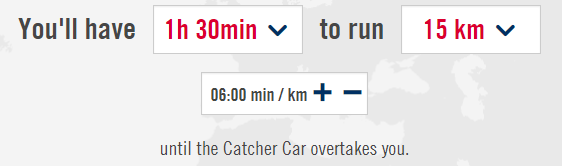
I started quite fast, pace around 5'20, and I am struggling now to keep it steady. The WFL website is offering a goal calculator, to get an estimation of how far you can run before getting caught. It is based on your average pace. If I stick to my usual 6:00, I shall reach 15km, or 19km with a pace of 5'30. Let's give it a try.

The app is kind of lazy and I don't get notified on where the car is behind me, I need to check my phone for that. I see the original 5km distance decrease slowly but surely. I know this route by heart so I can imagine where the car is. It's way more fun this way, than running around a closed loop, as they advise you to do if you are organising your own app run. I keep a steady 5'40 pace, but for how long?

The gap is closing up... I reach the 15th kilometer I was aiming for. But my pace is up to 6'20 now. I'm not a fast runner anymore, since I spent the last few years recovering from an injury and taking it easy. When I reach 16k, the sleepy voice finally wakes up to warn me that the chaser car is 500m behind me. But no countdown, no stressful music or any sign that it's coming closer and closer. Come on lazy developers, this is not motivating me at all!

You already know about my epic sprint over the last few hundreds meters, that would make Tom Cruise overly jealous! The virtual car overtakes me after 17,5 km and 1:45 hours on the road.


Overall it's a fun race, as you never really know how far you will go. But I'm sure the app run its nothing compared to the adrenalina of a real catcher car swooping on you. I just think the app could be a bit more exciting, with regular updates on where the car is, maybe some sounds or music to motivate you, and definitely a better voice! I will run again for sure, this time in a hosting city. I put you the link below, if you are interested. It's not just a race but also a wonderful charity event.

Next year, let's all run for those who can't :)
Event website: http://www.wingsforlifeworldrun.com